A hands-on workflow note from the MGL Videoservices camera department — Ing. Martin Gregor Lohr, Perchtoldsdorf/Vienna.
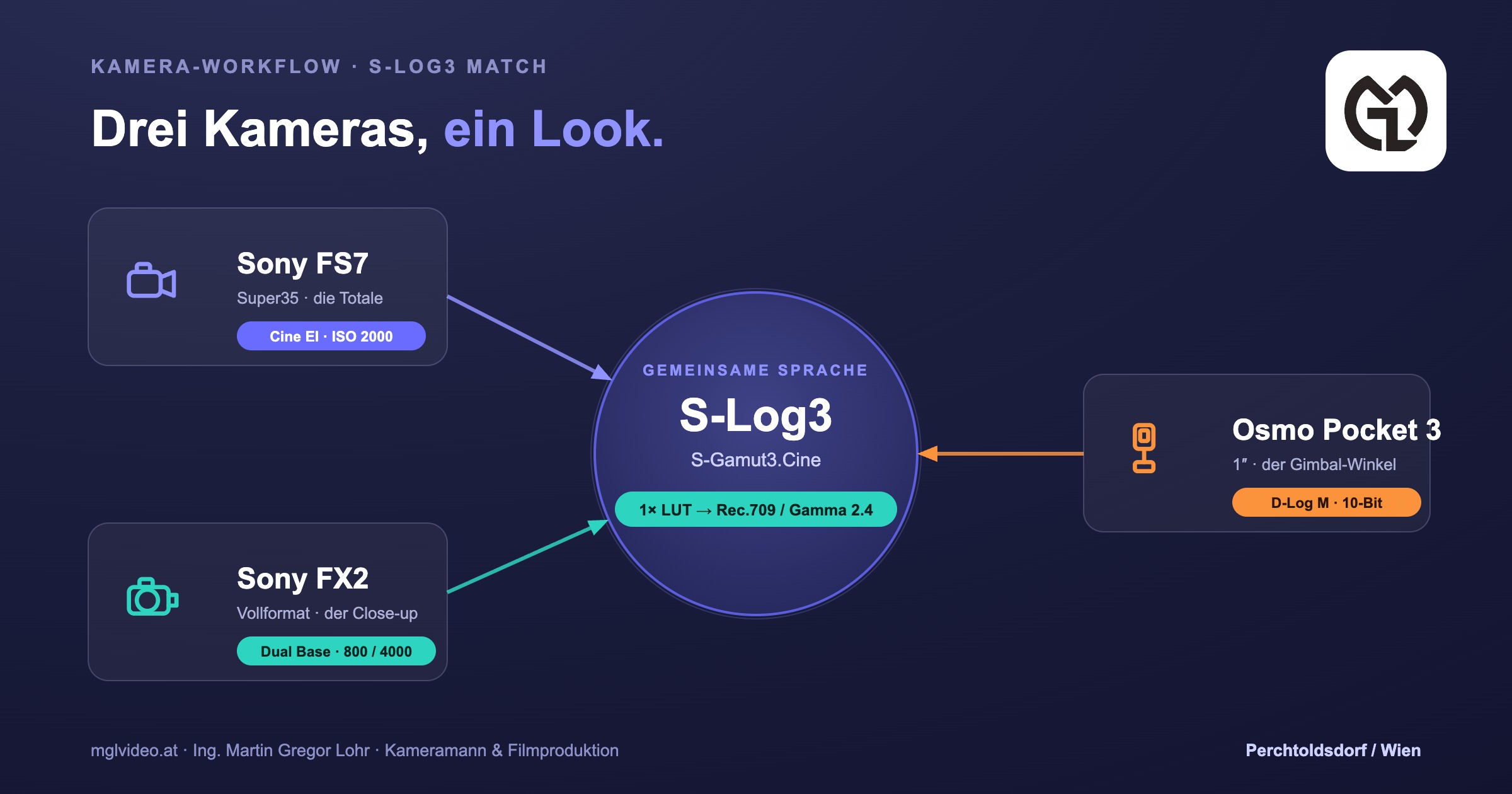
We love our Sony PXW-FS7. It is one of the most comfortable cameras we have ever worked with — the balance on the shoulder, the internal ND, the XDCAM reliability on long event days. When we added a Sony FX2 for compact, full-frame close-ups (and later a DJI Osmo Pocket 3 for the discreet, run-and-gun angle), we asked ourselves the obvious question: how do we get three very different cameras onto one common denominator, so the edit looks like a single camera moved around the room?
This is the workflow we settled on. We are writing it down partly as a cheat sheet for our own kits — and partly because it might save another camera operator a frustrating grade.
The challenge: three generations, one look
The FS7 (2014) and the FX2 are separated by roughly a decade of sensor technology and colour philosophy. The FS7 uses the older broadcast colour matrix; the FX2 uses Sony’s modern BIONZ XR science with the gorgeous but FX-only S-Cinetone look. If you bake the picture in-camera on each body, skin tones and contrast jump at every cut between the wide (FS7) and the close-up (FX2). Fixing that in post takes three times longer than the edit itself.
The common language: S‑Gamut3.Cine / S‑Log3
The one mathematical profile all the Sony bodies natively share is S-Gamut3.Cine / S-Log3. Put both the FS7 and the FX2 on it and you bypass their different internal colour matrices entirely. A quick word on the alternatives you will see in the menu: skip S-Log2 (dated, muddy shadows) and skip plain S-Gamut3 without the “.Cine” (its gamut is unnecessarily wide and fussy to grade). S-Gamut3.Cine / S-Log3 is the FS7 industry standard, converts most cleanly to Rec.709 and holds the best skin tones.
Exact settings — Sony FS7 (the wide)
- Mode: System → Base Setting → Shooting Mode → Cine EI
- Colour space: S-Gamut3.Cine / S-Log3
- White balance: pick a fixed preset — 3200 K, 4300 K or 5500 K (Cine EI only offers these three)
- Viewfinder: Video → Monitor LUT → s709 for the VF, so you judge a normal contrasty image, not the flat log
- Record clean: Monitor LUT → Internal Rec = OFF. The card must hold the flat S-Log3, never the baked LUT
- Exposure: native ISO 2000 in Cine EI. Rate it a touch brighter (EI 1000–1250, i.e. roughly +1 stop) and pull it back in post — the older sensor is noisy in the shadows. Use the built-in ND to stop down
Exact settings — Sony FX2 (the close-up)
- Mode: Shooting / Image Quality → Log Shooting → On (Flexible ISO or Cine EI)
- Colour space: S-Gamut3.Cine / S-Log3
- Dual base ISO: the FX2 has two native bases in S-Log3 — ISO 800 (low, for daylight & studio) and ISO 4000 (high, for low light). Stay on ISO 800 in controlled light; when it gets truly dark jump straight to ISO 4000 and avoid the in-between values (e.g. 2500), where the picture is noisiest
- White balance: set the exact same Kelvin value as the FS7. Never Auto WB
- Monitor: display LUT / gamma display assist to s709
- No internal ND: unlike the FS7, the FX2 has no built-in ND filter. Carry screw-in or variable NDs so you can keep the aperture you want on fast glass
Adding the DJI Osmo Pocket 3 as a third angle
The Pocket 3 is a brilliant, pocketable stabilised B-cam for the discreet angle, a gimbal move or an audience reaction shot. It will not speak S-Log3 — its log is D-Log M, 10-bit — but you can still fold it in cleanly:
- Shoot D-Log M in 10-bit (not the 8-bit standard profile), match the frame rate, and lock the white balance to the same Kelvin as the big cameras
- In the grade, convert D-Log M to Rec.709 with DJI’s official LUT (or a Color Space Transform), landing it on the same Rec.709 target as the Sony footage, then fine-match
- Know its limits: the 1″ sensor (9.4 MP) has less dynamic range and shallower latitude than the cinema bodies. Use it for motion and texture, not for the hero close-up that sits next to a perfectly exposed FX2 shot — and give it plenty of light
What you must nail on the day
- Lock white balance across all bodies to one identical Kelvin value (e.g. 5500 K daylight, 3200 K tungsten). A grey card beats anyone’s auto WB
- Same frame rate & shutter. Run every camera at the same fps and a matched 180° shutter so motion blur reads identically across cuts
- Match depth of field with aperture + ND, not ISO. Remember the FS7 is Super35 (~1.5× crop) and the FX2 is full-frame — the FX2 goes shallower at the same aperture, which is usually what you want for close-ups, but keep it harmonious
- Record 10-bit 4:2:2 on the FX2 (XAVC S-I) and 10-bit on the FS7 for maximum grading latitude
In post: one conversion for everything
Drop every clip onto the same base: Sony’s official s709 LUT, or in DaVinci Resolve a Color Space Transform from S-Gamut3.Cine / S-Log3 to Rec.709 / Gamma 2.4. The Pocket 3 gets its D-Log M→Rec.709 step to the same target. From there the Sony pair matches to ~90–95% automatically; you are left with minor brightness tweaks. If the sharper FX2 looks crisper than the FS7, pull the FX2’s edge sharpening down rather than artificially sharpening the FS7.
The kit cheat sheet
| Setting | Sony FS7 | Sony FX2 | DJI Osmo Pocket 3 |
|---|---|---|---|
| Sensor | Super35 (~1.5×) | Full-frame, 33 MP | 1″ CMOS, 9.4 MP |
| Mode | Cine EI | Cine EI / Flexible ISO | D-Log M (10-bit) |
| Gamma / gamut | S-Log3 / S-Gamut3.Cine | S-Log3 / S-Gamut3.Cine | D-Log M |
| Native / base ISO | 2000 | 800 & 4000 (dual base) | fixed (1″) |
| White balance | Preset 3200/4300/5500 K | Manual K = FS7 | Manual K = others |
| Internal ND | Yes (built-in) | No → external ND | No → external ND |
| Monitor view | s709 LUT (VF) | s709 / display LUT | Rec.709 view |
| Record | Clean log, LUT OFF | Clean log, 10-bit 4:2:2 | D-Log M 10-bit |
| Post target | Rec.709 / Gamma 2.4 via s709 LUT or Color Space Transform (Pocket 3 via D-Log M→Rec.709) | ||
Works the same with the FX3, FX30, FX6 & A7S III
None of this is FX2-specific. Any Sony that offers S-Gamut3.Cine / S-Log3 — FX3, FX30, FX6, FX9, A7S III, A7 IV — drops straight into the same pipeline. The FX6 and FX9 even bring internal ND like the FS7, which makes run-and-gun matching easier still. The rule is always the same: one log profile, one white balance, one conversion.
Pro knowledge from the kit — two FS7 bonuses:
• The FS7 forgot the date/time? Before you assume the internal buffer (RTC) cell is dead, leave the camera powered (a full BP-U battery or the DC-IN supply) and switched off for 24–48 h — the fixed internal cell recharges in standby. Only if it still forgets is a physical swap needed, and that cell sits behind the left operator panel on fragile ribbon cables — a job for Sony Pro Service.
• White Clip: active in Custom mode only (it is disabled in Cine EI, where log needs the full range). Set 105% for grading/online headroom, 100% for strict broadcast delivery.
FAQ
How do I match a Sony FS7 and a Sony FX2 for a multicam shoot?
Can I mix a DJI Osmo Pocket 3 with cinema cameras like the FS7 and FX2?
What base ISO should I use on the Sony FX2 and the FS7?
Does the Sony FX2 have internal ND filters?
Who does multi-camera film production in Vienna and Austria?
→ Talk to us about your next multicam or live-event production
© 2026 Ing. Martin Gregor Lohr · MGL Videoservices · mglvideo.at · Perchtoldsdorf/Vienna. Keywords: Kameramann, Filmproduktion, Wien, Live-Events, Sony FS7, Sony FX2, DJI Osmo Pocket 3, S-Log3, Multicam.
Eine Praxis-Notiz aus der Kameraabteilung von MGL Videoservices — Ing. Martin Gregor Lohr, Perchtoldsdorf/Wien.
Wir lieben unsere Sony PXW-FS7. Sie ist eine der angenehmsten Kameras, mit denen wir je gearbeitet haben — die Balance auf der Schulter, die internen ND-Filter, die XDCAM-Zuverlässigkeit an langen Eventtagen. Als wir eine Sony FX2 für kompakte Vollformat-Close-ups dazunahmen (und später eine DJI Osmo Pocket 3 für den unauffälligen, beweglichen Blickwinkel), stellte sich die naheliegende Frage: Wie bringen wir drei sehr unterschiedliche Kameras auf einen gemeinsamen Nenner, damit der Schnitt aussieht, als hätte sich eine einzige Kamera durch den Raum bewegt?
Das ist der Workflow, auf den wir uns festgelegt haben. Wir schreiben ihn teils als Spickzettel für unsere eigenen Koffer auf — und teils, weil er einem anderen Kameramann vielleicht ein frustrierendes Grading erspart.
Die Herausforderung: drei Generationen, ein Look
Zwischen der FS7 (2014) und der FX2 liegen rund zehn Jahre Sensortechnologie und Farbphilosophie. Die FS7 nutzt die ältere Broadcast-Farbmatrix, die FX2 die moderne BIONZ-XR-Farbwissenschaft mit dem wunderbaren, aber FX-exklusiven S-Cinetone. Brennst du das Bild in jeder Kamera einzeln ein, springen Hauttöne und Kontrast bei jedem Schnitt zwischen Totale (FS7) und Nahaufnahme (FX2). Das im Nachhinein anzugleichen dauert dreimal so lange wie der eigentliche Schnitt.
Die gemeinsame Sprache: S‑Gamut3.Cine / S‑Log3
Das einzige mathematische Profil, das alle Sony-Bodies nativ teilen, ist S-Gamut3.Cine / S-Log3. Stellst du FS7 und FX2 darauf, umgehst du ihre unterschiedlichen internen Farbmatrizen komplett. Kurz zu den Alternativen im Menü: Finger weg von S-Log2 (veraltet, matschige Schatten) und von reinem S-Gamut3 ohne „.Cine“ (der Farbraum ist unnötig weit und zickig im Grading). S-Gamut3.Cine / S-Log3 ist der FS7-Industriestandard, lässt sich am saubersten nach Rec.709 konvertieren und hat die besten Hauttöne.
Exakte Einstellungen — Sony FS7 (die Totale)
- Modus: System → Base Setting → Shooting Mode → Cine EI
- Farbraum: S-Gamut3.Cine / S-Log3
- Weißabgleich: festes Preset wählen — 3200 K, 4300 K oder 5500 K (Cine EI bietet nur diese drei)
- Sucher: Video → Monitor LUT → s709 für den VF, damit du ein normales, kontrastreiches Bild beurteilst statt des flachen Logs
- Sauber aufnehmen: Monitor LUT → Internal Rec = OFF. Auf die Karte gehört das flache S-Log3, niemals die eingebrannte LUT
- Belichtung: native ISO 2000 in Cine EI. Belichte etwas reichlicher (EI 1000–1250, also ca. +1 Blende) und zieh es in der Post zurück — der ältere Sensor rauscht in den Schatten. Zum Abblenden die internen ND nutzen
Exakte Einstellungen — Sony FX2 (die Nahaufnahme)
- Modus: Aufnahme / Bildqualität → Log-Aufnahme → Ein (Flexible ISO oder Cine EI)
- Farbraum: S-Gamut3.Cine / S-Log3
- Dual Base ISO: die FX2 hat in S-Log3 zwei native Basiswerte — ISO 800 (niedrig, für Tageslicht & Studio) und ISO 4000 (hoch, für Low Light). Bei kontrolliertem Licht auf ISO 800 bleiben; wird es richtig dunkel, direkt auf ISO 4000 springen und Zwischenwerte (z. B. 2500) meiden — dort rauscht das Bild am stärksten
- Weißabgleich: exakt denselben Kelvin-Wert wie die FS7. Niemals Auto-WB
- Monitor: Display-LUT / Gamma-Anzeigehilfe auf s709
- Keine internen ND: anders als die FS7 hat die FX2 keine eingebauten ND-Filter. Nimm Schraub- oder Vario-NDs mit, um bei lichtstarken Objektiven deine Wunschblende zu halten
Die DJI Osmo Pocket 3 als dritten Blickwinkel
Die Pocket 3 ist eine brillante, hosentaschen-kleine stabilisierte B-Cam für den unauffälligen Winkel, eine Gimbal-Fahrt oder einen Publikums-Reaktionsshot. Sie spricht kein S-Log3 — ihr Log heißt D-Log M, 10-Bit — lässt sich aber trotzdem sauber einfügen:
- Nimm D-Log M in 10-Bit auf (nicht das 8-Bit-Standardprofil), gleiche die Framerate an und fixiere den Weißabgleich auf denselben Kelvin-Wert wie die großen Kameras
- Im Grading D-Log M mit DJIs offizieller LUT (oder einem Color Space Transform) nach Rec.709 konvertieren — auf dasselbe Rec.709-Ziel wie das Sony-Material — und dann feinmatchen
- Grenzen kennen: der 1-Zoll-Sensor (9,4 MP) hat weniger Dynamikumfang und Spielraum als die Kino-Bodies. Setz sie für Bewegung und Textur ein, nicht für die Hero-Nahaufnahme direkt neben einem perfekt belichteten FX2-Shot — und gib ihr reichlich Licht
Was du am Drehtag zwingend treffen musst
- Weißabgleich über alle Bodies fixieren auf einen identischen Kelvin-Wert (z. B. 5500 K Tageslicht, 3200 K Kunstlicht). Eine Graukarte schlägt jeden Auto-WB
- Gleiche Framerate & Shutter. Jede Kamera auf derselben fps und einem angepassten 180°-Shutter, damit die Bewegungsunschärfe über die Schnitte identisch wirkt
- Schärfentiefe über Blende + ND angleichen, nicht über ISO. Die FS7 ist Super35 (~1,5× Crop), die FX2 Vollformat — die FX2 wird bei gleicher Blende flacher, was für Close-ups meist gewollt ist, aber halte es harmonisch
- 10-Bit 4:2:2 aufnehmen an der FX2 (XAVC S-I) und 10-Bit an der FS7 für maximalen Grading-Spielraum
In der Post: eine Konvertierung für alles
Leg jeden Clip auf dieselbe Basis: Sonys offizielle s709-LUT, oder in DaVinci Resolve ein Color Space Transform von S-Gamut3.Cine / S-Log3 nach Rec.709 / Gamma 2.4. Die Pocket 3 bekommt ihren D-Log M→Rec.709-Schritt auf dasselbe Ziel. Danach matchen die beiden Sonys zu ~90–95% automatisch; es bleiben minimale Helligkeitsanpassungen. Wirkt die schärfere FX2 knackiger als die FS7, nimm die Kantenschärfung der FX2 zurück, statt die FS7 künstlich hochzuschärfen.
Der Koffer-Spickzettel
| Einstellung | Sony FS7 | Sony FX2 | DJI Osmo Pocket 3 |
|---|---|---|---|
| Sensor | Super35 (~1,5×) | Vollformat, 33 MP | 1″ CMOS, 9,4 MP |
| Modus | Cine EI | Cine EI / Flexible ISO | D-Log M (10-Bit) |
| Gamma / Gamut | S-Log3 / S-Gamut3.Cine | S-Log3 / S-Gamut3.Cine | D-Log M |
| Natives / Basis-ISO | 2000 | 800 & 4000 (Dual Base) | fix (1″) |
| Weißabgleich | Preset 3200/4300/5500 K | Manuell K = FS7 | Manuell K = andere |
| Interne ND | Ja (eingebaut) | Nein → externe ND | Nein → externe ND |
| Monitor-Ansicht | s709-LUT (VF) | s709 / Display-LUT | Rec.709-Ansicht |
| Aufnahme | Sauberes Log, LUT OFF | Sauberes Log, 10-Bit 4:2:2 | D-Log M 10-Bit |
| Post-Ziel | Rec.709 / Gamma 2.4 via s709-LUT oder Color Space Transform (Pocket 3 via D-Log M→Rec.709) | ||
Funktioniert genauso mit FX3, FX30, FX6 & A7S III
Nichts davon ist FX2-spezifisch. Jede Sony mit S-Gamut3.Cine / S-Log3 — FX3, FX30, FX6, FX9, A7S III, A7 IV — passt direkt in dieselbe Pipeline. FX6 und FX9 bringen sogar interne ND wie die FS7 mit, was das Run-and-Gun-Matching noch leichter macht. Die Regel bleibt immer gleich: ein Log-Profil, ein Weißabgleich, eine Konvertierung.
Praxis-Wissen aus dem Koffer — zwei FS7-Bonbons:
• Die FS7 hat Datum/Uhrzeit vergessen? Bevor du die interne Pufferzelle (RTC) für tot erklärst: lass die Kamera 24–48 h mit Strom (voller BP-U oder DC-IN) und ausgeschaltet stehen — die fest verbaute Zelle lädt sich im Standby wieder auf. Erst wenn sie dann noch vergisst, ist ein physischer Tausch nötig — und die Zelle sitzt hinter dem linken Bedienpanel auf empfindlichen Flachbandkabeln: ein Fall für den Sony Pro Service.
• White Clip: nur im Custom Mode aktiv (im Cine EI deaktiviert, dort braucht Log den vollen Umfang). 105% für Grading-/Online-Spielraum, 100% für strikte Broadcast-Abgabe.
FAQ
Wie matche ich eine Sony FS7 und FX2 für einen Multicam-Dreh?
Kann ich eine DJI Osmo Pocket 3 mit Kinokameras wie der FS7 kombinieren?
Welches Basis-ISO bei Sony FX2 und FS7?
Hat die Sony FX2 interne ND-Filter?
Wer macht Mehrkamera-Filmproduktion in Wien und Österreich?
→ Sprich mit uns über deine nächste Multicam- oder Live-Event-Produktion
© 2026 Ing. Martin Gregor Lohr · MGL Videoservices · mglvideo.at · Perchtoldsdorf/Wien. Keywords: Kameramann, Filmproduktion, Wien, Live-Events, Sony FS7, Sony FX2, DJI Osmo Pocket 3, S-Log3, Multicam.