
BroadcastPrompter.Pro.
The broadcast teleprompter I built — after 25 years at high-stakes live events.
Two systems. One seamless switch.
Why I built it
For 25 years I have run teleprompters for very important people — at the shareholder meetings of global corporations, at congresses, at the kind of high-stakes events where a failure simply cannot happen.
I always carried backups. But they were complicated to set up, and to actually switch over I had to keep everything synchronized by hand. That always bothered me.
The turning point came during a very large event. At a similar event in another country something had gone wrong, and the whole team was acutely aware that here, nothing could be allowed to fail. That is when I started building this software.
The question I kept asking was simple: I have every backup component in reserve — but if something breaks mid-show, I am still relying on a manual switchover. What I really needed was a second machine running in parallel, completely independent, that instantly takes over the output the moment the main one fails.
And everything else the software learned
- ▸ Seamless master/backup switchover — two independent systems, instant takeover.
- ▸ Live editing on air — change a line and the host reads it in real time.
- ▸ Update Script — a new script version keeps all your formatting, anchors and cues.
- ▸ Rundown & named anchors — jump to any point in one click.
- ▸ Overlays — reading line, clock/countdown, progress bar, operator-only blind spot.
- ▸ Coloured cue symbols right inside the reading text.
- ▸ Mirroring & safe area for any camera hood or beam-splitter, clean ATEM output.
- ▸ Foot-pedal & keyboard control, signed local sync, no cloud, optional air-gap, autosave.
- ▸ Cross-platform — macOS, Windows, Linux; master and backup may even differ.
And with all of it, one thing: you can simply deliver a secure show.
See the full product
BroadcastPrompter.Pro has its own product site with the complete feature set, technical specs and a demo request. Developed in Vienna by MGLSoft — Martin Lohr.
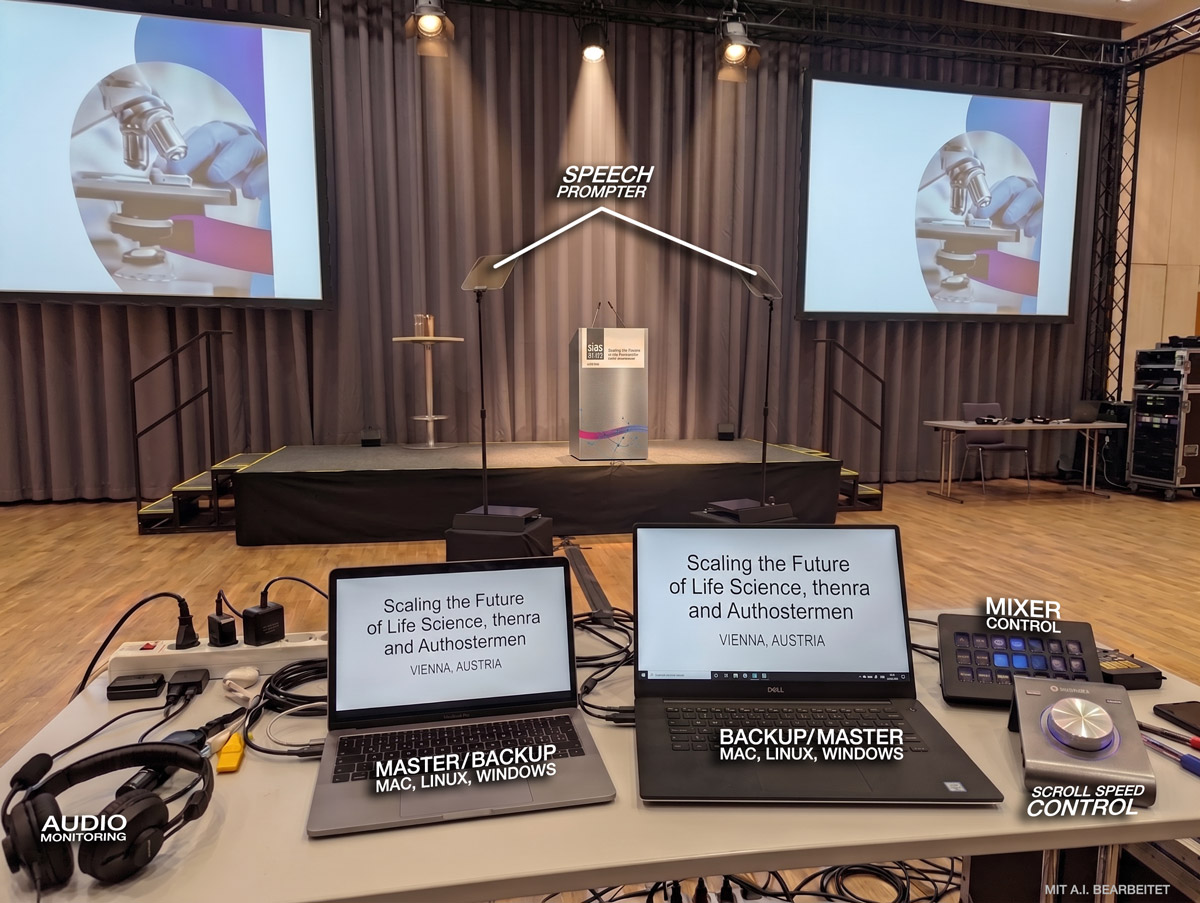
Live in action
A real setup from a live event in Vienna. Two laptops run in parallel — a master and a backup — and either one can drive the prompters. The idea is simple: as many truly independent backups as possible, each on its own device.
- Master / Backup — two laptops running in parallel; either can take over instantly.
- Mixer / Switch — selects which laptop is sent out to the prompters. A two-finger swipe across the touchpad hands over control in an instant.
- Scroll Speed Control — take over the scrolling speed by hand whenever I prefer.
- Independent feeds — a lectern monitor can show the text too, and a prompter can run straight off a laptop, bypassing the switch entirely. Backup upon backup.
Photo with AI editing.
A few things it just does.
macOS · Windows · Linux
Runs on all three — and master and backup don’t even have to be the same operating system.
Live edits on air
Change a line and the host reads it instantly — no reload, no lost position. The one thing we’ve never seen another prompter do.
Master & backup in parallel
Two stations run word-for-word in sync from the start, with instant takeover in either direction.
No cloud, signed link
The control link is signed and paired, stays on your local network, and can go fully air-gapped while you prompt.
Update Script
A new script hours before the show? Your formatting — anchors, speakers, breaks and cues — carries onto the new version automatically.
Foot-pedal & overlays
Drive the scroll with your foot, with reading line, clock, countdown, progress bar and coloured cue symbols on screen.